

/tmp/lshttpd/swap 寶塔默認(rèn)設(shè)置的swap交換分區(qū)文件 這個(gè)怎么改到數(shù)據(jù)盤
OpenLiteSpeed move Swapping Directory
OpenLiteSpeed 移動交換目錄
By default OpenLiteSpeed use /tmp/lshttpd/swap for temp files. If your /tmp partition is small, disk may get full.
默認(rèn)情況下,OpenLiteSpeed 對臨時(shí)文件使用 /tmp/lshttpd/swap。如果您的 /tmp 分區(qū)很小,磁盤可能會變滿。
To move OpenLiteSpeed swap partition to / partition do the following.
要將 OpenLiteSpeed 交換分區(qū)移動到 / 分區(qū),請執(zhí)行以下操作。
mkdir -p /lswstmp/lshttpd/swap
chmod 750 /lswstmp/lshttpd
chmod 700 /lswstmp/lshttpd/swap
chown -R nobody:nobody /lswstmp/lshttpd
Now login to OpenLiteSpeed admin interface at
現(xiàn)在登錄 OpenLiteSpeed 管理界面
https://your-server-ip:7080/login.php
If you don’t have user name and password, you can reset it by running command
如果您沒有用戶名和密碼,可以通過運(yùn)行 command 來重置它
/usr/local/lsws/admin/misc/admpass.sh
Once logged in, go to
登錄后,轉(zhuǎn)到
Server Configuration > General
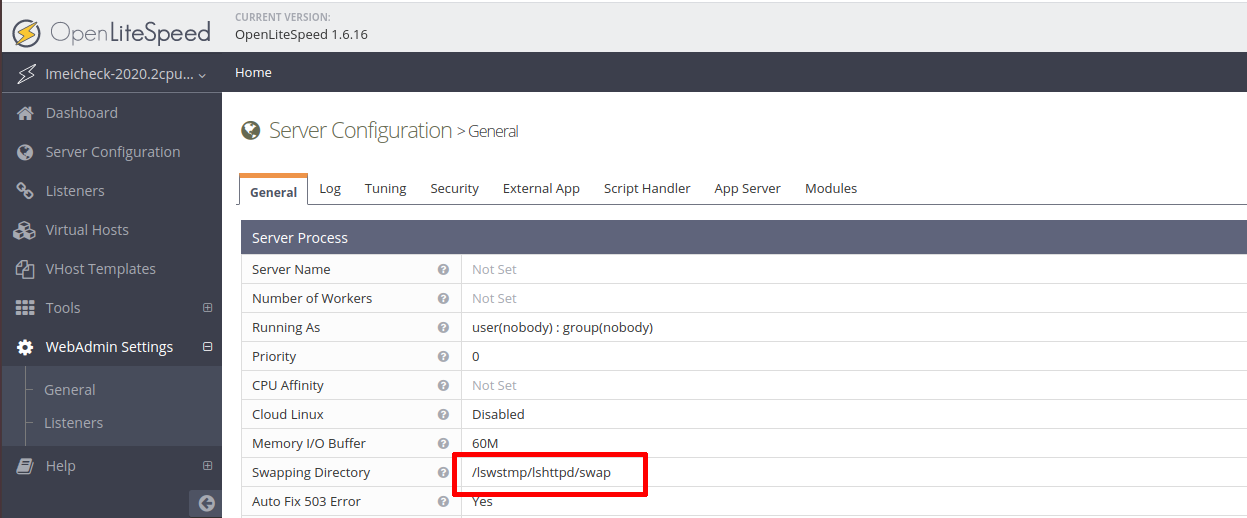
Under “Server Process’ section, you need to edit value of “Swapping Directory”. Default value is “/tmp/lshttpd/swap”, change it to “/lswstmp/lshttpd/swap”.
在“Server Process(服務(wù)器進(jìn)程)”部分下,您需要編輯 “Swapping Directory”(交換目錄)的值。默認(rèn)值為 “/tmp/lshttpd/swap”,將其更改為 “/lswstmp/lshttpd/swap”。
Restart OpenLiteSpeed. You can do it using web interface or using SSH.
重新啟動 OpenLiteSpeed。您可以使用 Web 界面或使用 SSH 來完成。
systemctl restart lsws
評論